
A home security camera buying guide is essential for anyone looking to improve their home safety and protection. Modern security cameras have become valuable smart home tools that allow homeowners to monitor their property, discourage unwanted activity, check on family members, and communicate remotely.
Choosing the right security camera can provide greater convenience and peace of mind. However, with so many options available, finding the best camera for your specific needs can be challenging.
Security cameras come in different types, designs, features, and price ranges. Some models offer advanced features like AI detection, cloud storage, night vision, and smart home integration, while others focus on basic monitoring. Without proper research, you may spend extra money on features you do not need or choose a camera that lacks important functions.
In this security camera buying guide, we will explain everything you need to know before making a purchase, including camera types, key features, installation options, storage choices, pricing, and expert tips to help you choose the best security camera for your home.
How Do Home Security Cameras Work?
Home security cameras work by monitoring activity, capturing video footage, and allowing homeowners to check their property remotely. These cameras use a lens and built-in image sensors to capture and process video. Depending on the model, a security camera can provide live video streaming, record footage for later viewing, or perform both functions at the same time.
Most modern home security cameras connect to a home Wi-Fi network, allowing users to access live and recorded footage through a smartphone app or web dashboard. When the camera detects motion, it can automatically start recording and send an instant notification to the user’s phone. This feature helps homeowners quickly respond to unusual activity, even when they are away from home.
Security camera recordings can be stored in two main ways: cloud storage or local storage. Cloud storage saves videos online, making them accessible from anywhere, but many providers charge a monthly subscription fee. Local storage uses options such as microSD cards, network video recorders (NVRs), or a dedicated home hub, allowing users to keep their footage at home and maintain greater control over their privacy.
Understanding how home security cameras work can help you choose the right system based on your security needs, budget, and preferred storage method.
Types of Security Cameras
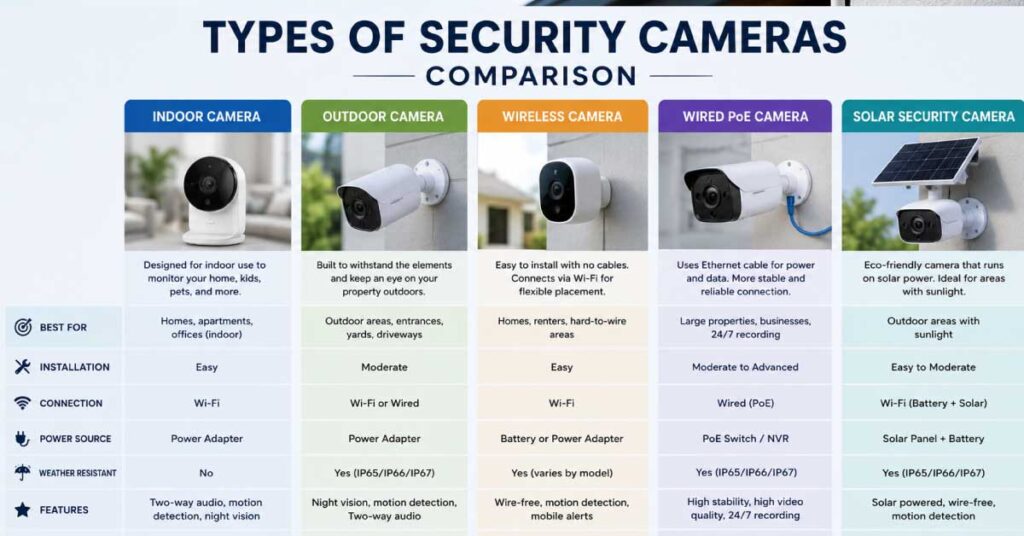
There are several types of home security cameras available, and each one is designed for a specific purpose. Choosing the right type of camera is an important step in building an effective home security system. The best option depends on where you want to install the camera, what you want to monitor, and which features are most important for your needs.
Indoor Cameras
Indoor security cameras are designed to monitor activities inside your home. They are ideal for areas such as living rooms, hallways, home offices, nurseries, and other shared spaces. Many indoor cameras include useful features like two-way audio, allowing you to communicate with family members, check on pets, or interact with people inside your home remotely.
Because indoor cameras are not built to handle harsh weather conditions, they are usually smaller and less durable than outdoor models. They are designed for indoor environments and typically do not have weather-resistant protection.
For privacy reasons, indoor cameras should generally be installed in common areas rather than private spaces such as bedrooms or bathrooms.
Outdoor Cameras
Outdoor security cameras are built to protect the exterior areas of your home, including driveways, entrances, garages, and backyards. These cameras are designed to withstand different weather conditions and usually come with weather-resistant housing for better durability.
Many outdoor cameras include advanced features such as night vision, motion detection, built-in spotlights, and wide-angle lenses. These features help monitor your property in low-light conditions and provide better visibility after dark.
Compared with indoor cameras, outdoor models often offer a wider field of view, allowing them to cover larger areas. Their visible presence can also help discourage potential intruders before they approach your property.
Wired vs. Wireless Security Cameras
Wired and wireless security cameras are two common installation options, each with its own advantages.
Wired security cameras connect directly to a power source and network system, providing a stable connection and reliable performance. They are a good choice for homeowners who need continuous recording, long-term reliability, and coverage for larger properties. However, installation can be more complex because cables need to be installed.
Wireless security cameras use Wi-Fi connections and are often powered by batteries or a standard power outlet. They are easier to install and can be placed in more locations without running cables through walls. This makes them a popular choice for renters and homeowners who want a simple setup.
However, wireless cameras may have limitations, including battery maintenance, Wi-Fi signal issues, and reduced reliability in areas with weak network coverage. For large properties or professional security setups, wired systems may provide better long-term performance.
| Camera Type | Best For | Price Range |
|---|---|---|
| Indoor Camera | Rooms, pets, family monitoring | $30-$150 |
| Outdoor Camera | Driveway, yard protection | $50-$300 |
| Wireless Camera | Easy installation | $40-$250 |
| PoE Camera | Large properties | $100-$500 |
Video Quality: What Resolution Do You Really Need?
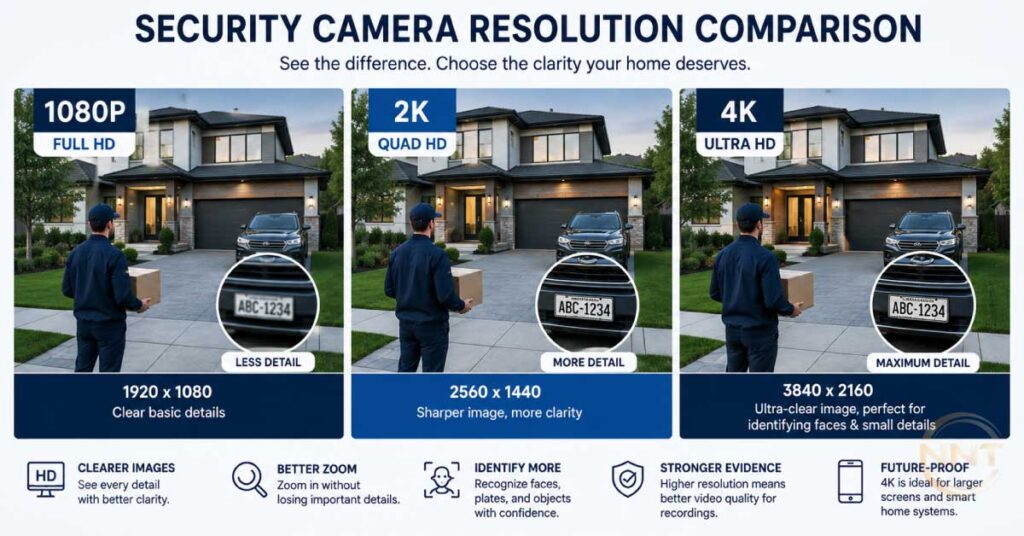
Video quality is one of the most important factors to consider when choosing a home security camera. A higher-resolution camera can capture more details, which is especially useful when you need to identify faces, license plates, or other important details from recorded footage.
Security camera resolution is measured in pixels, and the most common options available today include 1080p (Full HD), 2K, and 4K resolution. Each resolution level offers different image quality, storage requirements, and pricing.
1080p (Full HD) Security Cameras
A 1080p security camera is a budget-friendly option that provides clear video quality for basic home monitoring. It is suitable for indoor use, apartments, small rooms, entrances, and areas where you do not need extremely detailed footage.
For many homeowners, 1080p offers a good balance between image quality, storage space, and affordability.
2K Security Cameras
A 2K security camera provides noticeably sharper images compared with 1080p models. It captures more details, making it a better choice for outdoor areas, driveways, front doors, and larger spaces where identifying people or objects is more important.
If you want better image clarity without the higher storage requirements of 4K, a 2K camera is often the ideal middle-ground option.
4K Security Cameras
A 4K security camera delivers the highest level of image detail among common consumer security cameras. It is useful for large properties, wide coverage areas, and situations where you may need to zoom in on recorded footage while keeping the image clear.
However, higher resolution comes with additional requirements. 4K cameras use more storage space and require stronger Wi-Fi bandwidth for smooth live streaming and remote viewing. Before choosing a 4K camera, consider your storage capacity, internet speed, and network reliability.
Other Factors That Affect Video Quality
Resolution is not the only factor that determines security camera performance. Other features can also impact image clarity, including:
- Frame rate: A higher frame rate creates smoother video and makes it easier to see moving objects clearly.
- Image compression: Advanced compression technology helps reduce storage usage while maintaining good video quality.
- Low-light performance: Night vision and sensor quality affect how well the camera performs in dark conditions.
When selecting a security camera, choose a resolution that matches your security needs, installation area, storage capacity, and budget. The highest resolution is not always necessary—the right balance between quality and practicality is what matters most.
Field of View and Coverage Area
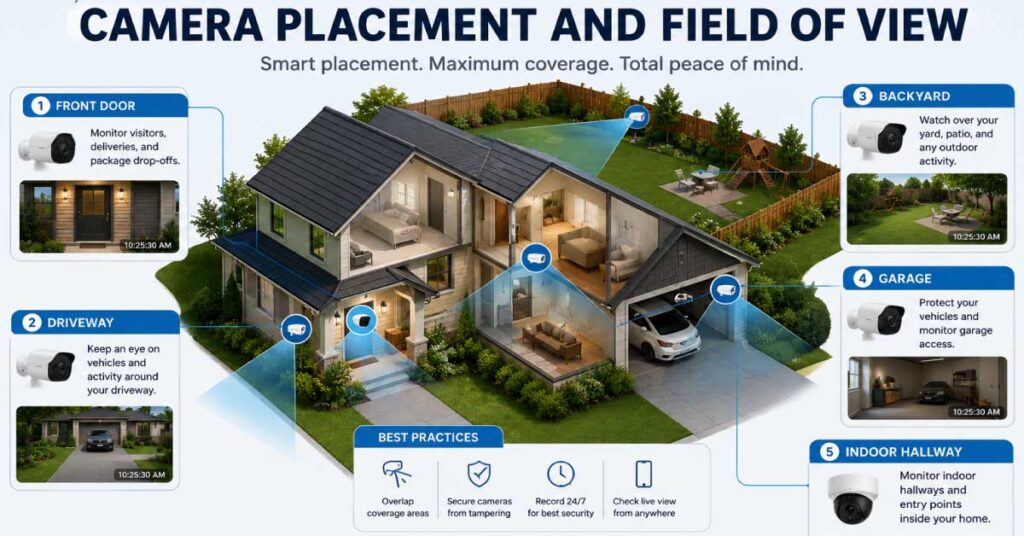
The field of view (FOV) is an important feature to consider when choosing a security camera because it determines how much area the camera can capture. A wider field of view allows a single camera to monitor a larger space, which can reduce the number of cameras needed to cover your home.
However, a wider viewing angle is not always better. Some ultra-wide-angle cameras may create image distortion, making objects appear smaller or changing the natural proportions of the scene. When selecting a camera, it is important to find the right balance between coverage area and image clarity based on your security needs.
The ideal field of view depends on where you plan to install the camera and what you want to monitor. For example, a wide-angle camera can be useful for monitoring large rooms, driveways, or backyards, while a narrower field of view may be better for focusing on specific areas such as a front door or entry point.
How Camera Placement Affects Coverage
Proper camera placement plays a major role in maximizing coverage and improving home security. For indoor areas, placing cameras in room corners or mounting them higher on walls can provide a wider view and reduce blind spots.
For outdoor security cameras, focus the camera toward important areas such as entrances, driveways, walkways, garages, and other locations with frequent activity. Avoid positioning cameras where objects, walls, or lighting conditions block the view.
A well-planned camera placement strategy helps you get better coverage, clearer footage, and stronger overall protection from your security system.
Night Vision and Low-Light Performance
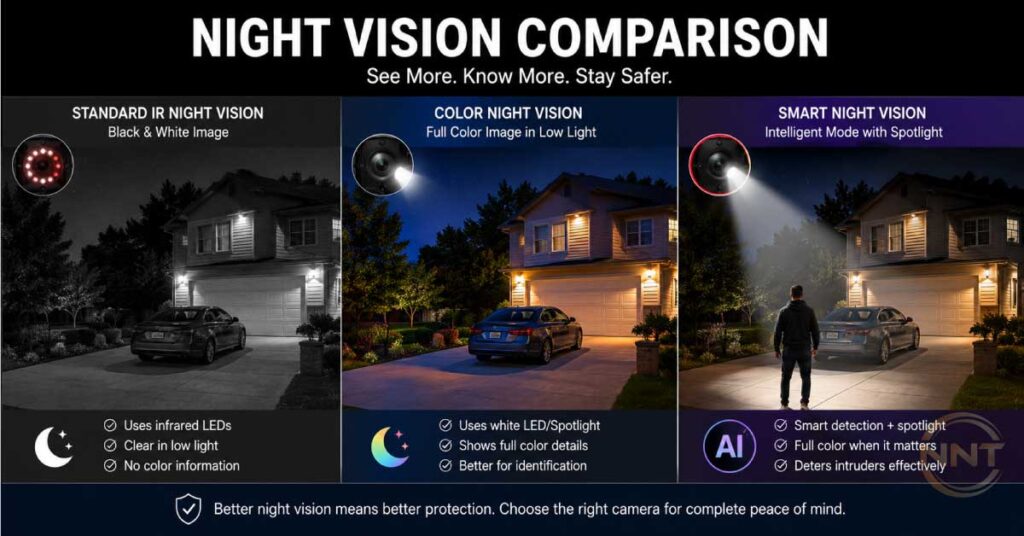
Night vision is a critical feature to consider when choosing a home security camera, especially for outdoor monitoring. Many security incidents occur during nighttime hours, making it important for your camera to capture clear footage in dark environments.
Most security cameras use infrared (IR) LEDs to record video in complete darkness. These cameras typically produce black-and-white footage at night while still providing enough detail for monitoring activity. More advanced models offer color night vision, which uses additional light sources or improved sensors to capture more detailed and realistic images in low-light conditions.
However, not all cameras provide the same level of night vision performance. Image clarity can vary depending on the camera sensor, infrared range, lens quality, and lighting conditions. Before purchasing an outdoor security camera, it is helpful to check customer reviews and view sample night footage to understand real-world performance.
What Is Low-Light Performance?
Low-light performance refers to how well a security camera can capture clear images when there is little available light. A camera with strong low-light capabilities can provide better visibility in areas such as driveways, backyards, garages, entrances, and hallways during the evening or early morning.
When choosing a security camera for nighttime protection, look for features such as:
- Infrared night vision
- Color night vision
- High-quality image sensors
- Built-in spotlights
- Wide dynamic range (WDR) technology
A camera with reliable night vision and strong low-light performance ensures that your home remains monitored even when lighting conditions are poor.
Motion Detection and Smart Alerts
Modern home security cameras use motion detection technology to improve security and provide faster responses to unusual activity. When a camera detects movement, it can automatically begin recording and send instant alerts through a smartphone app, text message, or email.
This feature allows homeowners to monitor their property remotely and take quick action when something unexpected happens. Whether you are away from home, traveling, or simply want additional protection, motion detection helps ensure important events are captured.
Basic motion sensors detect any type of movement, but advanced security cameras use AI-powered detection technology to identify and differentiate between people, vehicles, animals, and other objects. This helps reduce unnecessary alerts caused by pets, tree movement, or passing cars.
Customizable Smart Alerts
Smart alerts give users more control over when and why they receive notifications. Many modern security cameras allow you to customize detection zones and sensitivity levels based on your preferences.
For example, you can set your camera to send alerts when someone approaches your front door while ignoring movement from a nearby street or sidewalk. Custom settings help reduce false alarms and ensure you only receive important notifications.
When choosing a security camera, look for features such as:
- Person detection
- Vehicle detection
- Activity zones
- Adjustable motion sensitivity
- Real-time smartphone notifications
These smart features make security monitoring more convenient and effective.
Audio Features and Communication
Many modern home security cameras include two-way audio, allowing you to hear and communicate with people near the camera through a smartphone app. This feature is useful for talking with family members, checking on pets, communicating with visitors, or receiving deliveries when you are not at home.
Two-way audio can also provide an additional security benefit. Speaking through the camera may help discourage unwanted visitors by letting them know the property is being monitored.
However, audio quality can vary between different camera models. Some cameras offer clearer microphones and louder speakers, while others may have limited sound quality. Before buying a security camera, consider how important communication features are for your needs and choose a model with reliable audio performance.
Storage Options and Ongoing Costs
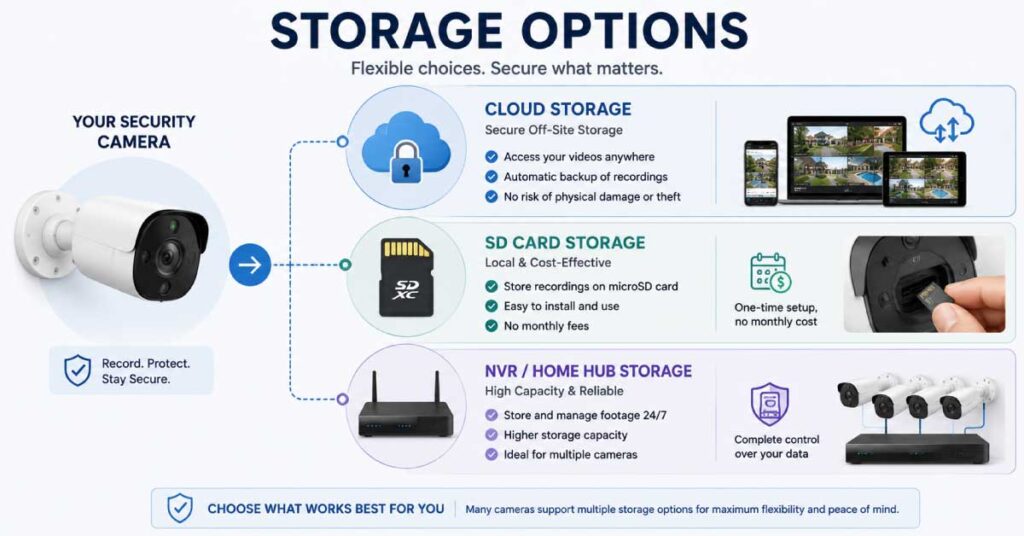
Storage is an important factor to consider when choosing a home security camera. The way your camera stores recorded footage affects accessibility, privacy, and long-term costs. Most security cameras use one of three storage methods: cloud storage, local storage, or hybrid storage.
Cloud Storage
Cloud storage saves your security camera recordings online, allowing you to access videos from anywhere using a smartphone app or web browser. This option is convenient for homeowners who travel frequently or want remote access to their footage at any time.
Many cloud storage services offer additional features, such as longer video history, advanced alerts, and easier backup options. However, most providers require a monthly or yearly subscription, which can increase the overall cost of owning a security camera over time.
Local Storage
Local storage saves recorded footage directly on a device at your home. Common options include microSD cards, network video recorders (NVRs), or dedicated security camera hubs.
The main advantage of local storage is that you maintain greater control over your video recordings and usually avoid ongoing subscription fees. However, accessing stored footage remotely may be more limited compared with cloud-based systems, depending on your camera setup.
Hybrid Storage
Some security cameras offer hybrid storage, which combines both cloud and local storage options. This gives homeowners more flexibility by allowing them to store footage locally while also keeping backup copies online.
Hybrid storage can provide a good balance between convenience, privacy, and cost. For example, you can use local storage for everyday recordings while relying on cloud storage for important events or additional protection.
Choosing the Right Storage Option
Before buying a security camera, consider how often you need to access recordings, your privacy preferences, and your long-term budget. Cloud storage offers convenience, local storage provides more control, and hybrid storage gives you the flexibility of both options.
Choosing the right storage method ensures your security camera system meets your needs without unexpected costs.
Power Options and Battery Life
The power source is an important consideration when choosing a home security camera. Different power options affect installation flexibility, maintenance requirements, and long-term reliability. The most common options include battery-powered cameras, wired cameras, and solar-powered cameras.
Battery-Powered Cameras
Battery-powered security cameras offer excellent installation flexibility because they can be placed almost anywhere without needing electrical wiring. They are especially useful for renters, temporary setups, or locations where running cables is difficult.
The main advantage of battery cameras is their simple installation process. However, they require regular maintenance because the battery needs to be checked and recharged periodically. Battery life can vary depending on factors such as motion detection frequency, video resolution, weather conditions, and how often the camera records.
Wired Cameras
Wired security cameras receive power through your home’s electrical system, eliminating the need to recharge batteries. They are known for reliable performance and are a good choice for homeowners who need continuous monitoring and long-term security.
Wired camera systems are often recommended for larger homes, businesses, and outdoor areas where consistent power is important. However, installation can be more complicated because it may require cable routing, drilling, or professional installation.
Solar-Powered Cameras
Solar-powered security cameras use built-in solar panels to recharge their batteries using sunlight. They provide a low-maintenance solution by reducing the need for frequent manual charging.
These cameras combine the flexibility of battery-powered models with the convenience of renewable power. Solar security cameras are especially useful for outdoor locations such as gardens, driveways, gates, and remote areas where access to electrical outlets is limited.
However, solar-powered cameras work best in locations that receive enough sunlight throughout the year. Before choosing this option, consider your area’s weather conditions and the camera’s solar charging performance.
Choosing the Right Power Option
The best power option depends on your installation location, maintenance preference, and security requirements. Battery-powered cameras offer flexibility, wired cameras provide dependable continuous power, and solar-powered cameras deliver convenience with minimal maintenance.
Privacy, Security, and Legal Considerations
Prioritizing the privacy and security of both yourself and those around you when selecting and installing a home security camera is extremely important. Strong passwords; preferably with two-factor authentication should be used to protect access to your footage and records from unauthorized third parties. Secure video footage on encrypted connections from your cameras also helps prevent unauthorized interception of your video feeds and record storage
Also,consider the privacy of others. Inform family members, housemates or guests that there are cameras in use in your home, and be sure not to place security cameras in private areas such as bedrooms or bathrooms. Education about the laws related to recording by video or audio because some jurisdictions have laws regarding recording without the consent of the recorded parties.
How to Choose the Right Home Security Camera for Your Home
Choosing the right home security camera depends on your home type, security goals, and installation needs. A camera system that works well for an apartment may not be the best choice for a large house with multiple entry points.
Before buying a security camera, consider where you need monitoring, how much coverage you require, and which features are most important for your lifestyle.
Apartments and Rental Homes
For apartments and rental properties, compact wireless security cameras are often the best option. They are easy to install, usually require minimal setup, and can be moved easily if you change locations.
Indoor cameras work well for monitoring entry doors, living rooms, hallways, and other shared areas. Renters should avoid permanent installations that require drilling or modifications and should always respect the privacy of roommates or guests.
Single-Family Houses
Single-family homes usually require a combination of indoor and outdoor security cameras for better protection. Outdoor cameras are especially useful for monitoring driveways, front doors, garages, yards, and other exterior areas.
For long-term reliability, wired cameras or solar-powered cameras can be excellent choices because they provide continuous power and reduce the need for frequent battery maintenance.
Families and Multi-Occupant Homes
Homes with children, elderly family members, or multiple occupants can benefit from cameras with features such as two-way audio, motion alerts, and smart notifications.
These features allow homeowners to communicate with family members, check on loved ones, and receive updates about important activity. However, cameras should always be installed in appropriate locations while respecting everyone’s privacy.
Large Homes and Properties
Large properties with multiple entrances, outdoor spaces, or larger coverage areas may require a multi-camera security system. Installing cameras at important locations helps eliminate blind spots and provides more complete protection.
For larger homes, consider systems that support multiple cameras, reliable storage options, and strong network performance. Proper camera placement is essential to ensure every important area is monitored effectively.
Final Tip for Choosing a Security Camera
The best security camera system is not always the most expensive option. Choose a camera setup that matches your home’s size, security needs, budget, and preferred features. A well-planned system provides better protection and long-term value.
Home Security Camera Buying Guide: Budget and Pricing
Your budget plays an important role when choosing the right home security camera. Security cameras are available at different price points, and the best choice depends on your security needs, home size, and the features you want.
While affordable cameras can handle basic monitoring, higher-priced models usually offer better image quality, advanced smart features, and improved reliability. Below is a breakdown of what you can expect at different budget levels.
Budget-Friendly Security Cameras (Under $100)
Entry-level security cameras are a great option for homeowners and renters who need basic monitoring at an affordable price. Many models in this range offer essential features such as 1080p video quality, motion detection, smartphone alerts, and local storage support.
These cameras are suitable for apartments, small rooms, entryways, or anyone looking for an additional layer of security without spending a lot of money. Although budget models may not include advanced features like AI detection or premium video quality, they can still effectively monitor everyday activity.
Mid-Range Security Cameras ($100–$300)
Mid-range security cameras offer a balance between price and performance. These models often include improved video quality, better night vision, cloud storage options, two-way audio, and more advanced mobile app features.
For many homeowners, this price range provides the best value because it delivers reliable security features without the high cost of premium systems. Mid-range cameras are suitable for apartments, single-family homes, and families who want better protection with modern smart features.
Premium Security Cameras ($300 and Above)
Premium security cameras are designed for users who want advanced protection and maximum performance. These models often include features such as 2K or 4K video resolution, AI-powered motion detection, enhanced night vision, advanced app controls, and smart home integration.
High-end cameras are ideal for large properties, homeowners with extensive security needs, and users who want professional-level features. Some premium systems also support professional monitoring services and integration with other smart home devices.
Choosing the Right Security Camera Budget
The most expensive security camera is not always the best choice. Consider your home’s size, installation location, required features, and long-term costs before making a decision.
For basic monitoring, an affordable camera may be enough. For better coverage, smart features, and long-term reliability, investing in a mid-range or premium system may provide better value.
Final Checklist Before You Buy a Home Security Camera
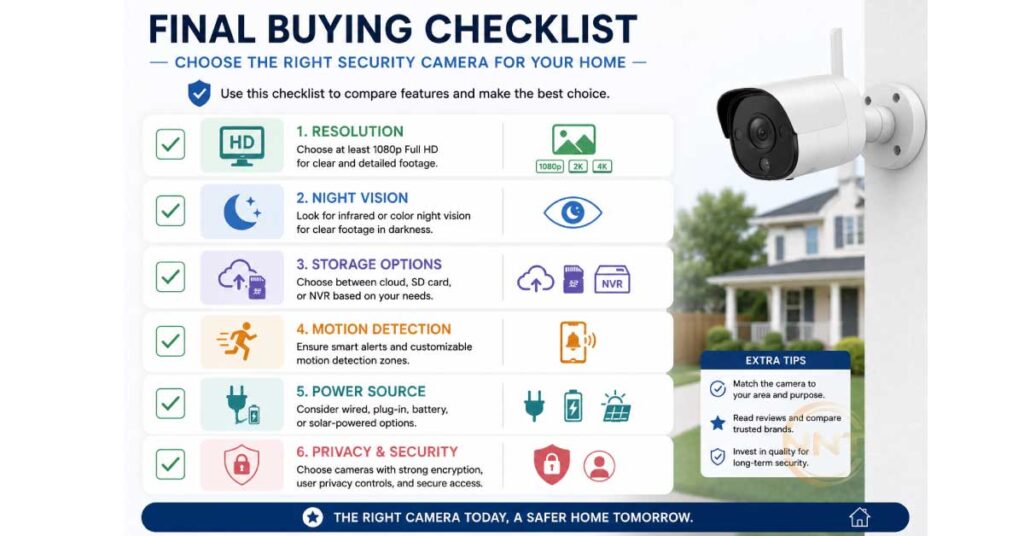
Before purchasing a home security camera, it is important to review your needs and compare the available options. Use this checklist to make sure you choose a camera system that provides the right balance of security, features, and value.
✅ Identify the areas you want to monitor
Decide which parts of your home need protection, such as entrances, driveways, hallways, living rooms, garages, or outdoor spaces.
✅ Choose the right camera type
Determine whether you need indoor cameras, outdoor cameras, wired cameras, or wireless cameras based on your installation location and security requirements.
✅ Check video quality and night vision
Select a camera with the right resolution and low-light performance for the areas you want to monitor. Higher resolution can provide more details, especially for outdoor surveillance.
✅ Choose the right storage option
Compare cloud storage, local storage, and hybrid storage options based on your privacy preferences, convenience, and long-term costs.
✅ Consider power requirements
Decide whether a battery-powered, wired, or solar-powered camera is the best fit for your location and maintenance preference.
✅ Review smart features
Look for useful features such as two-way audio, smartphone app access, motion alerts, AI detection, and smart home compatibility.
✅ Compare features and pricing
Evaluate different camera models to find the best value. Avoid paying extra for features you do not need, but make sure the camera includes the functions that matter most to you.
Conclusion
Choosing the right home security camera can help protect your property, family, and valuable belongings. The best camera system depends on your home’s layout, security needs, budget, and preferred features.
Before making a purchase, focus on camera placement, video quality, storage options, and smart features to find a solution that provides reliable protection and long-term value.
For more expert reviews, buying guides, and technology tips, visit NewNewstrend. Our goal is to help readers make smarter purchasing decisions with practical research and easy-to-understand advice.
Frequently Asked Questions (FAQs)
1. Do Home Security Cameras Work Without Wi-Fi?
Yes, some home security cameras can work without Wi-Fi, depending on the camera type and storage method. Cameras with local storage, such as microSD cards or connected recording devices, can continue recording without an internet connection.
However, without Wi-Fi or internet access, you may not be able to view live footage remotely, receive smartphone alerts, or access recordings through a mobile app. For most modern smart security cameras, an internet connection is required for remote monitoring and advanced features.
2. Are Cloud Storage Subscriptions Mandatory for Security Cameras?
No, cloud storage subscriptions are not always required. Many security cameras support local storage options, such as microSD cards, network video recorders (NVRs), or home security hubs.
Cloud storage provides convenient remote access, automatic backups, and additional security features, but it usually requires a monthly or yearly subscription fee. The best option depends on your privacy preferences, budget, and how often you need remote access to recorded footage.
3. How Many Security Cameras Do I Need for My Home?
The number of security cameras you need depends on your home’s size, layout, and the areas you want to monitor.
For a small apartment, one or two cameras may be enough to cover important areas such as the front door and main living space. Larger homes may require a combination of indoor and outdoor cameras to monitor entrances, driveways, yards, and other important locations.
A good approach is to identify potential blind spots and install cameras in areas where they provide the most security coverage.